
AI Santa photo: make a visit-with-Santa picture from photos you have
Updated
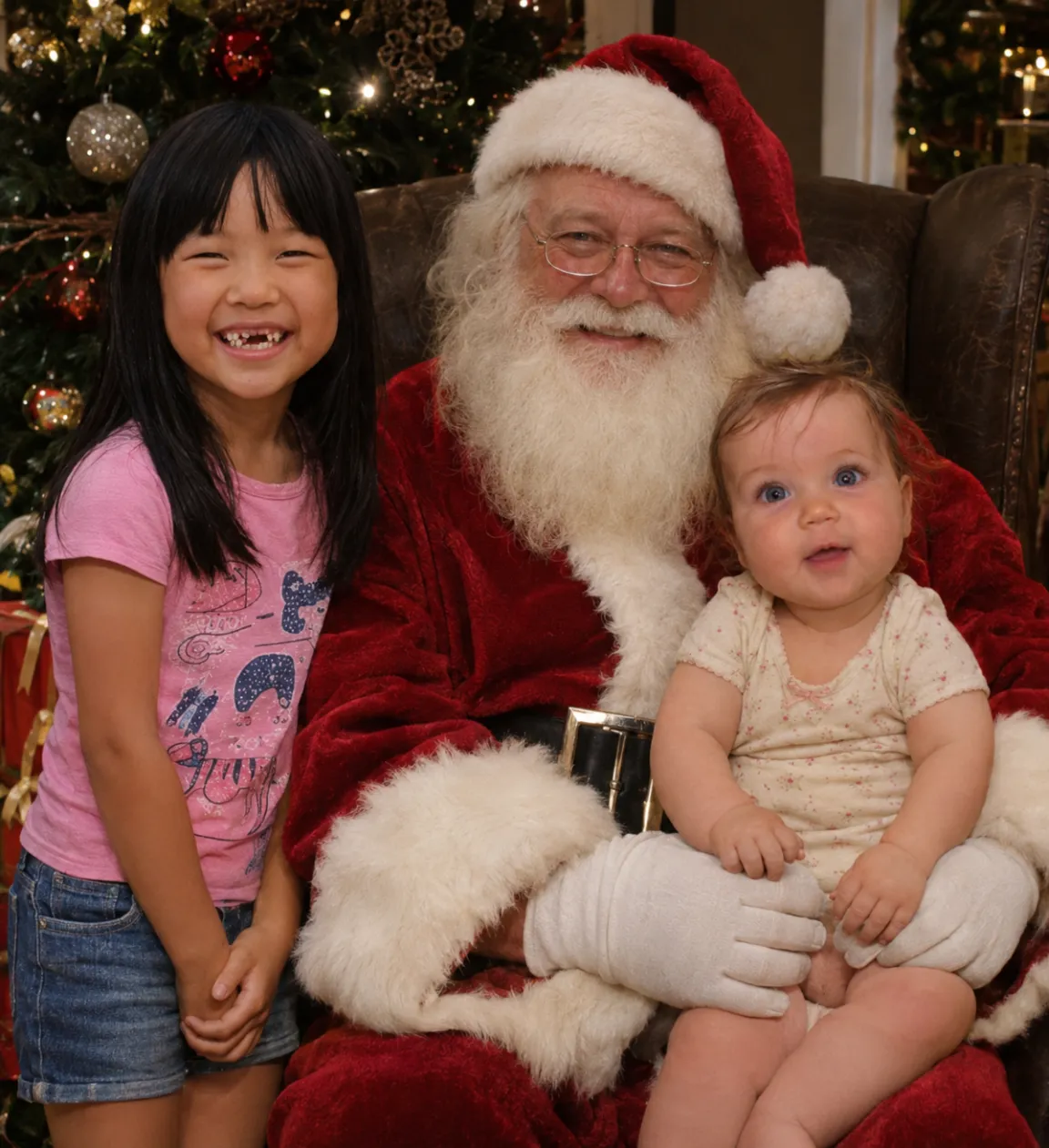
Upload one clear photo of each child, baby or adult (up to 6), label who is who, keep the "Visit with Santa" scene checked and see a free preview in about 2 minutes. Everyone keeps their own face and real age next to a jolly Santa by the tree, and a gallery from $9 includes a printable 5 x 7 inch card.
1 · Photos of everyone
Say who each photo is, so everyone keeps their own face. Children: only your own, as their parent or guardian.
- Free preview, no email needed
- Photos deleted after 30 days
- One free correction
2 · Christmas scenes
Your preview uses the first one you pick. A gallery spreads its pictures across 2 to 8 of them, by size.
Free, takes about 2 minutes, no payment details. By continuing you agree to the terms. If you leave an email we send the preview and at most two reminders; unsubscribe any time.
Making your preview… about a minute or two
Not quite right? Say what's off and we'll make it again, free.
Get your Christmas photos
Preview without the watermark, a gallery and your card
Card, Apple Pay, Google Pay · Ready in 10 to 30 minutes
How this differs from pasting Santa into a photo
- Most Santa photo apps paste a cutout Santa onto your living-room snapshot, so the lighting and scale rarely match.
- Here the whole scene is composed together: a velvet armchair, warm tree lights, wrapped gifts and festive outfits, while each child or adult keeps the face from their own reference photo.
- If siblings never look at the camera at the same time, upload a separate photo of each child (like the girl and baby in the sample above) and they sit together in one picture.
- Parents, grandparents or the family dog can join the same Santa portrait too.
Steps for a natural Santa portrait
- Pick one well-lit, recent photo per child or family member, face clear and unobstructed.
- Upload them above, enter a first name or label, and mark each child as Child or Baby so the AI keeps their exact age.
- Leave "Visit with Santa" first in the scene list so your free preview uses it.
- Add any must-keep detail (a missing front tooth, glasses, pigtails) and generate the free watermarked preview.
- Use the free correction if anything looks off, or pick a gallery size to get high-resolution photos plus your 5 x 7 Christmas card.
When an AI Santa photo helps most
- Babies and toddlers who melt down in crowded mall lines or around strangers in beards.
- Kids who were sick the weekend you booked Santa photos.
- Cousins or grandparents in different cities who want one shared Santa keepsake.
- Pets that aren't allowed at local Santa events.
Questions
Can I upload photos of my own children?
Yes, if you're their parent or guardian. Uploaded photos are private, never used to train AI, and automatically deleted 30 days after your pictures are made (or whenever you click delete).
Will it make my baby or toddler look older?
Labeling a photo as Baby or Child tells the prompt to keep their exact age and proportions. Check the free preview before paying, and use the free correction if needed.
Is the preview free?
Yes. You get one 768 px watermarked preview and one free correction with no email or card required. Full galleries start at $9 for 20 pictures and a 5 x 7 card.
Related
- AI Christmas photo generator
- How to put separate photos into one Christmas card photo
- No Christmas card photo yet? How to get one without a photoshoot
- Why AI changes faces in Christmas photos, and how to keep them right
- How to make a Christmas photo with ChatGPT (and keep everyone's face)
- Christmas card photo ideas: 14 to try this year
- Christmas pajama family photos: ideas, poses and how to get one
- Pet Christmas photos: make one from photos you already have
- AI Christmas card generator from your family's photos
- Pricing